
Apps in a keystroke
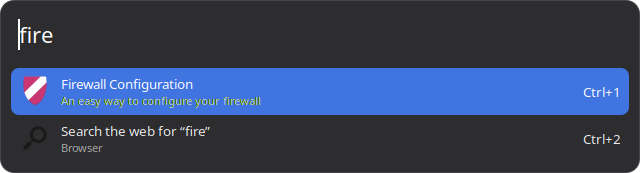
Type a few letters and press Enter. Applications are ranked by name, then by generic name and keywords, with their icons.
A calculator built in
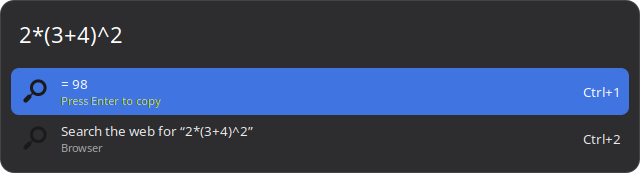
Type 2*(3+4)^2 or sqrt(16) and Enter copies the result. It never runs your text as code.
Files from your home
Searches your home folder through plocate, skipping hidden folders, and opens the file with its default application.
Web search
The last row sends what you typed to your browser, so there is always something to press Enter on.
One shortcut
Super+Space opens and closes it. Ctrl+1 to Ctrl+9 run a row directly, Esc or a click outside closes it.
Private and light
One Python file with GTK 3. No telemetry, no history, no network of its own. Installed with a script that checks the sha256 of the download.
See it at work
Questions
Which desktops does it work on?
It is a GTK 3 app written in Python, so it runs on Linux Mint Cinnamon, GNOME, Xfce, MATE and other GTK desktops. The installer binds Super+Space for you on Cinnamon; on the others you bind a key to the command yourself.
How do I install and update it?
One command, on the install page. Run it again to update; it checks the sha256 of the download against the one GitHub publishes.
Does it send my searches anywhere?
No. It has no telemetry, history or network of its own. The web search row only opens your browser with the text you typed.
Is it like the launcher of macOS?
It covers the daily part: opening apps, finding files and doing quick math from the keyboard. Lupa is not affiliated with Apple; Spotlight and macOS are trademarks of Apple Inc. The documentation lists what it does and its limits.